
Mount an under desk power strip with screws into keyhole slots, a heavy-duty adhesive strip, or a clamp-on tray, depending on how permanent you need the fix to be. Screws give the strongest hold, adhesive suits renters who can't drill, and clamp trays work well on sit-stand desks you don't want to puncture. Whichever method you choose, the one rule that overrides everything else: buy a mountable, surge-protected strip and never daisy-chain it into another extension lead.
The steps, product features, and safety checks below cover the rest.
TL;DR:
- Use a surge-protected, mountable power strip with a joule rating of at least 900 for reliable under-desk safety and performance.
- Screw mounting provides the most durability for fixed desks, while adhesive is suitable for renters or temporary setups, but both have weight and stress limits.
- Clamp-on trays are ideal for sit-stand desks and flexible for temporary or movable installations, avoiding holes and residue.
- Always leave slack in cables for height adjustments and secure large adapters separately to prevent strain on the sockets.
- Never daisy-chain multiple power strips, and regularly inspect for heat, wear, or dislodgment to prevent electrical hazards.
Table of Contents
- Choosing the right mounting method for your under desk power strip
- Step-by-step: mount a power strip under your desk safely
- What to look for when buying a power strip for under-desk use
- Placement, routing and ongoing cable management after mounting
- Essential safety rules and common mistakes to avoid
- What actually matters when mounting power under a desk
- ULTI's clamp-on and tray solutions for under-desk power
- Sources
- FAQ
Choosing the right mounting method for your under desk power strip
Your desk material and how often you plan to move things around decide which mounting method actually works. Get this wrong and you'll either drill through a laminate top you didn't need to, or watch an adhesive strip peel off under the weight of three phone chargers and a laptop brick.
Screw mounting is the most durable option for a desk you own and don't intend to move. Most power strips designed for under-desk use come with keyhole slots on the back, so you screw two anchor points into the underside and slide the unit into place. For particleboard or MDF desktops, comparative testing on mounting methods confirms screws outlast adhesive by a wide margin, particularly once cable weight starts pulling at an angle rather than straight down.
Adhesive mounting suits renters, or anyone who wants to test a position before committing. 3M VHB tape holds more weight than Command-style strips and cures fully within 24 hours, but neither is designed for constant lateral stress. Product reviews on mountable strips report that adhesive mounts can fail over several months when cables tug sideways every time you plug in a laptop, so treat adhesive as a light-duty solution for desks with only two or three low-draw devices.
Clamp-on trays split the difference. They grip the desk's edge or frame with a tension clamp, need no drilling or sticky residue, and come off in seconds if you relocate. This is the obvious choice for a standing desk, since the clamp travels with the frame rather than fighting against constant height changes.
Cable trays and baskets aren't a power strip mount so much as a home for what sits beside it. Use one when you've got bulky wall adapters or a router that generates heat and needs airflow around it, rather than being wedged tight against a solid surface.
Frame-mounting with zip ties works on metal-framed desks where there's a crossbar to loop around. It's cheap and removable, though less tidy than a purpose-built tray.
Run through this before you commit to a method:
- Is the desktop solid wood, laminate over particleboard, or a metal frame?
- Will you be moving the desk, or adjusting its height regularly?
- How many devices, and how heavy are the plugs and adapters?
- Do you need this to survive a house move or office relocation?
Pro Tip: If you're not sure whether your landlord allows drilling, start with a clamp-on tray. You can always upgrade to screws later if you end up staying put, but you can't undo screw holes.
Step-by-step: mount a power strip under your desk safely
Once you've picked a method, the process itself only takes about twenty minutes for most desks.
- Measure and plan the position. Rear-centre is generally the best spot, since it keeps the strip out of legroom while staying within easy reach of the wall socket and your knees don't brush against it. Workspace organisation guidance consistently points to this as the default placement because it balances being hidden with being reachable.
- Check switch access. If your strip has a physical on/off switch, make sure you can reach it without crawling under the desk. Mounting it slightly forward of dead-centre, angled towards where you sit, solves this.
- Test-fit before fixing anything. Hold the strip in position, mark the mounting points with a pencil or masking tape, and step back to check cable reach to both the wall socket and your devices.
- For screw mounting: drill pilot holes first. On desktops between roughly 0.75 inches and 2 cm thick, appropriately sized screws with pilot holes give a secure hold without splitting particleboard or punching through the desktop surface. Skip the pilot hole and you risk cracking the underside veneer.
- For adhesive mounting: clean the surface with isopropyl alcohol, press the strip firmly for a full sixty seconds, then leave it under light pressure (a stack of books works) for the full 24-hour cure before hanging any weight on it.
- For clamp trays: tighten the clamp screw until the tray sits flush against the frame or edge, then give it a firm tug test before loading it with the power strip.
- Secure large power bricks separately. Bulky laptop or monitor adapters strain the strip's sockets if left hanging. Anchor them in a tray or with a Velcro strap so their weight doesn't pull on the plug itself.
- Add strain relief. Loop a small amount of slack into the cable near the plug so tension pulls on the loop, not the connection point.
- Run final checks. Flip the switch, wiggle the mount to confirm there's no play, and if you've got a sit-stand desk, raise and lower it fully to check the cable doesn't snag or stretch tight at either extreme.
Pro Tip: Plug in your heaviest device first during testing, not last. If a mount is going to fail under load, you want to find out before your laptop charger is dangling from it at 6pm.
What to look for when buying a power strip for under-desk use
Not every power strip on the shelf is built to hang upside down under a desk. A few specifications separate a genuinely mountable unit from one that'll work loose within a month.
Surge protection rating matters more than most buyers realise. Look for a joule rating, which measures how much energy the strip can absorb before it stops protecting your equipment. Mountable under-desk strips commonly sit in the 900 to 1,200 joule range, with a resettable circuit breaker as a backup. A strip with no joule rating listed at all usually means it offers no real surge protection, just a switch and sockets.
USB power output decides how much charging you can retire from your wall. If you're powering laptops directly through USB rather than a bulky brick, prioritise a strip offering USB-C with Power Delivery. Furniture power modules built for sit-stand desks now pair 65W USB-C PD on the desktop with extra AC receptacles underneath, which is enough to charge most laptops without their original charger at all.
Beyond those two figures, check for:
- Wide-pitch outlet spacing, so oversized wall adapters don't block the socket beside them.
- Keyhole slots or an integrated mounting bracket on the housing itself, rather than a strip you'd need to improvise a mount for.
- A cord long enough for your setup, typically 6ft/2m, with a flat or right-angled plug if your wall socket sits in a tight space behind furniture.
- Individually switched or fused outlets, a feature more common on professional under-desk units that lets you kill power to one device without cutting the rest.
- Certification marks appropriate to where you're buying, confirming the unit meets local electrical safety standards rather than being an uncertified import.
For a shared office or a fixed workstation that will never move, a flush in-desk or edge-mount module is worth the extra installation effort. These units sit recessed into a cut-out in the desktop, specify exact cut-out dimensions and surge-protection ratings, and give a genuinely clean finish for permanent commercial fit-outs where a hanging strip would look out of place.
Placement, routing and ongoing cable management after mounting
Where you mount the strip only solves half the problem. What happens to the cables running to and from it decides whether your desk looks tidy in six months or like a drawer of tangled headphone wires.
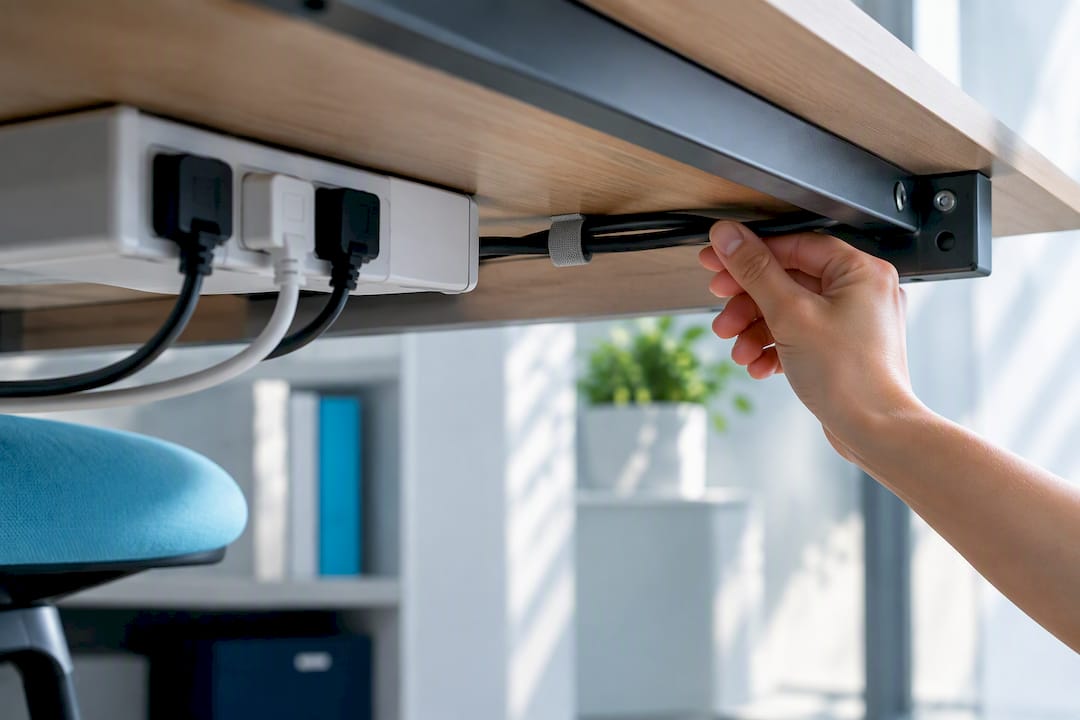
Rear-centre placement, high enough that the strip clears your knees but low enough that the switch stays within reach, remains the standard recommendation. Keep it away from heating vents, radiators, or anywhere damp, since heat and moisture both shorten a strip's working life faster than normal wear does.
From there, cable management is mostly about giving every wire a defined path rather than letting it hang free:
- Run a cable tray or basket along the rear crossbar to carry wires from the strip to your monitor, PC, and desk lamp in one bundle.
- Use adhesive clips on the desk legs to route vertical cable runs (power cord to wall socket, for instance) so they don't swing loose.
- Bundle parallel cables with reusable Velcro sleeves rather than zip ties, since sleeves let you add or remove a device without cutting anything.
- Store oversized adapters and power bricks in the tray itself or Velcro-strapped to the underside of the desktop, so their weight never rests on the strip's socket.
Sit-stand desks need one extra step: leave deliberate slack. As the desk rises and falls, cables stretched taut at full height will eventually fray or pull loose at the plug. Coil the extra length into a spiral wrap or a dedicated cable chain, and anchor that coil to the desk frame itself rather than letting it hang from the power strip.
Check the installation every few months. Look for discolouration or warmth around the socket, a strip that's started to wobble on its mount, or fraying near the plug. Any of those is a sign to replace the unit rather than keep using it.
Ulti's guide to cable management for standing desks goes further into routing choices if you're setting up a full sit-stand workstation rather than a single power strip.
Essential safety rules and common mistakes to avoid
Most under-desk power problems trace back to the same handful of mistakes, and nearly all of them are avoidable with a bit of planning.
Never daisy-chain power strips. Plugging one strip into another to extend your outlet count overloads the amp rating of the first unit and is one of the most common causes of overheating in home offices. If you need more sockets, buy a strip with more outlets, not a second strip.
Respect the amp rating. A standard strip is rated for a fixed current load, usually printed on the underside. Running a space heater or a monitor with a high-draw power supply off the same strip as your PC and peripherals can push past that limit even if nothing trips immediately.
Never enclose the strip in a sealed box or wrap it in fabric. Power strips need airflow to dissipate heat. A cable box that looks tidy but traps warm air around the strip is a fire risk dressed up as good housekeeping, echoed by the same ventilation guidance found on manufacturer installation pages for in-desk power modules.
Inspect regularly. Look for frayed cords, loose sockets that no longer grip a plug firmly, or discolouration around the outlets. Replace the strip rather than keep using one showing any of these signs.
If you're renting, stick to non-destructive mounts. Adhesive strips and clamp trays leave no permanent mark. For a shared office with wiring you're not confident about, ask facilities or bring in an electrician rather than guessing.
- If the strip feels warm to the touch during normal use, unplug it immediately.
- If it trips repeatedly, remove some of the load before resetting it again.
- If neither fixes the problem, have it inspected or replace it outright.
Pro Tip: A power strip that trips once under a heavy load (like a space heater plus a monitor) isn't necessarily faulty. One that trips repeatedly under normal daily use is telling you something's wrong, and it's not worth ignoring.
What actually matters when mounting power under a desk
Most guides on this topic spend too long on the mounting hardware and not enough on the strip itself. Screws versus adhesive is a five-minute decision once you know your desk material. The surge protection rating and whether the unit is built to be mounted at all matter far more, and they're the details most people skip past to get to the drilling.
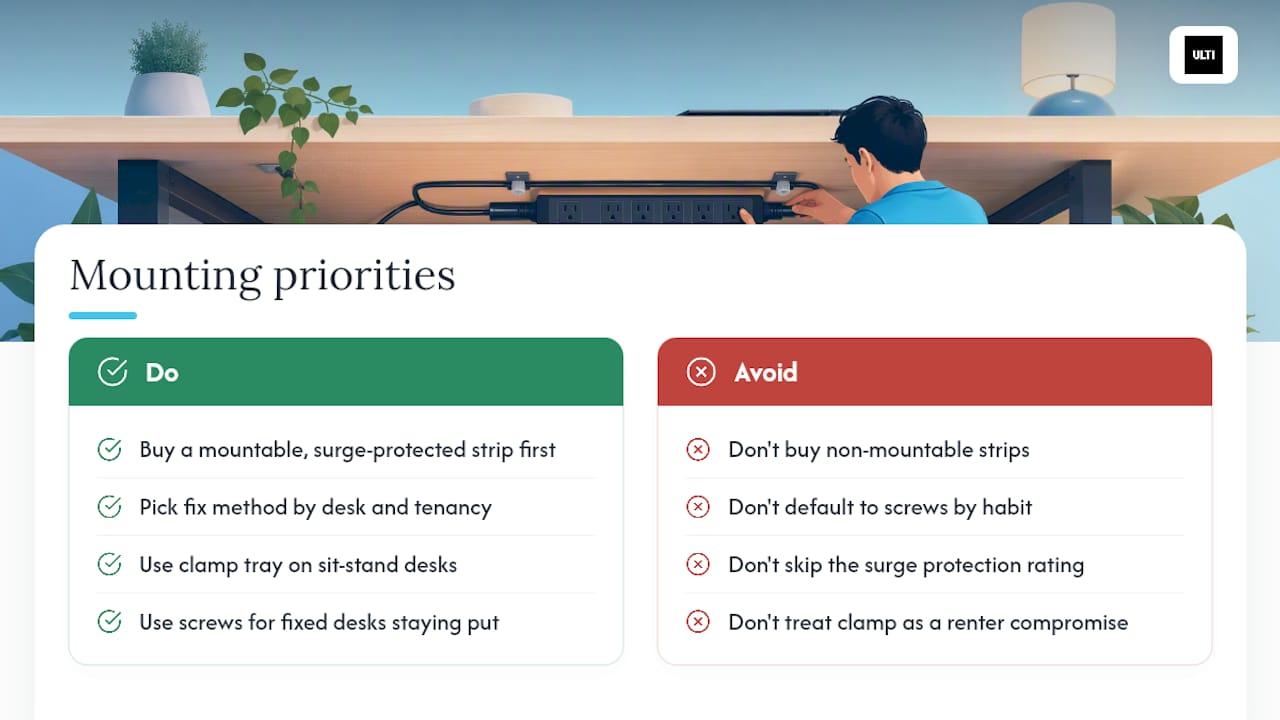
The renter-versus-owner divide gets overstated too. A clamp-on tray isn't a compromise you settle for because you can't drill. It's frequently the better choice on a sit-stand desk regardless of tenancy, because it moves with the frame instead of fighting it. Screws still win for a fixed desk that's staying put for years, but plenty of homeowners default to them out of habit rather than genuine need.
If there's one thing worth prioritising above the rest, it's this: buy the mountable, surge-protected strip first, then decide how to fix it in place. Get the unit right and the mounting method becomes a straightforward choice based on your desk and your tenancy, not a safety gamble.
— ULTI
ULTI's clamp-on and tray solutions for under-desk power
If you'd rather not improvise with tape and zip ties, The brand sells two mounting solutions designed for under-desk power management. The clamp-on under-desk cable management spine needs no drilling at all, making it the straightforward pick for renters or anyone with a sit-stand desk that moves daily.

For a desk you own outright and want a permanent fix for, the cable management tray organiser uses a hang-on screw design built to hold a power strip and its adapters securely, without the wobble of an improvised bracket. Both are modular, so they fit alongside Ulti's standing desks or install just as easily under a desk you already own.
If you're setting up a whole office rather than a single desk, Ulti's installation service handles fitting for you, useful when you're mounting power management across multiple workstations at once and want it done to a consistent standard. Browse the Ulti or get in touch to request a fitting quote for your setup.
Sources
- Under Desk Power Strip product listing with surge protection and USB PD - Newegg
- How to hide power strip under desk (how-to guide)
- Electriduct in-desk flush mount power strip product page
FAQ
Which power strip is best for under-desk use?
Choose a strip specifically built for mounting, with keyhole slots or a bracket on the housing, a surge protection rating (commonly 900 to 1,200 joules), and USB-C PD to support laptop charging. Ulti's cable management tray is designed to hold this kind of strip securely once you've picked one.
How do you attach a power strip to the underside of a desk?
Screw it into keyhole slots after drilling pilot holes, stick it with heavy-duty adhesive after a full 24-hour cure, or fit it into a clamp-on tray that grips the desk edge or frame without any drilling. The right method depends on your desk material and whether you're renting.
Is there a surge protector for under-desk power?
Yes. Most mountable under-desk strips include built-in surge protection alongside a resettable circuit breaker, and joule ratings in the 900 to 1,200 range are common in units designed for this kind of mounting. Avoid any strip that doesn't list a joule rating at all.
Can you plug a standing desk into a power strip?
Standing desk motors typically draw modest current and can run through a properly rated power strip, but leave slack in the cable so it doesn't stretch tight as the desk rises and falls. Never daisy-chain the strip into another extension lead, and route the extra cable into a coil anchored to the desk frame rather than left hanging loose.