

A minimal desk setup is a work surface holding only what you touch during a normal work session, your monitor, keyboard, mouse, and one personal item, with everything else stored out of sight. The single change that delivers the most visible result fastest is clearing the surface completely and switching to single-cable docking, so one connection powers your whole setup instead of five. Below you'll find practical ideas, component advice, and a quick reset routine to keep it that way.
TL;DR:
- Using a single cable to power your setup maximizes surface clearance and simplifies cable management, drastically reducing visual clutter.
- Choosing a monitor arm and a full-surface desk pad with a unified color palette enhances both aesthetics and functionality, making clutter less noticeable.
- Prioritizing storage solutions like under-desk drawers and wall-mounted pegboards keeps daily items accessible while maintaining a tidy surface.
- Establishing a regular decluttering routine, including daily surface clearing and weekly box tests, helps sustain minimalism over time.
- Opting for furniture with integrated cable management and multi-functional accessories reduces the need for multiple individual items, maintaining a clean appearance.
Table of Contents
- Fundamentals of a minimal desk setup
- 10 minimal desk setup ideas to copy quickly
- Key components and how to choose them
- Quick reset: the daily and weekly routine to keep the desk minimal
- How Ulti products support a minimal desk
- Choosing multi-functional tools and accessories to minimize clutter
- Guidelines for selecting furniture materials and colours to enhance the minimalist aesthetic
- Tips for digital minimalism
- Step-by-step decluttering process before setting up the desk
- Storage solutions that maintain minimalism without sacrificing accessibility
- Author perspective: trade-offs we see, and what actually works
- How Ulti can help you build a minimal desk
- Sources
- FAQ
Fundamentals of a minimal desk setup
Before you buy anything, get the rules right. A cluttered desk with expensive gear still looks cluttered, and a minimal one built from budget parts still looks calm if the basics are sound.
Start with what stays on the surface. Daily-use items only: monitor, keyboard, mouse, and one personal object, a photo, a small plant, whatever you actually want to see every day. Everything else, chargers, spare cables, notebooks you're not using, gets a drawer or a shelf.
Colour matters more than people expect. A full-surface desk pad in a neutral tone unifies your surface instantly and hides the mess of cables running along the back edge. Pair it with a single palette, black and white, or wood and white, rather than mixing finishes.
Ergonomics isn't separate from minimalism, it's what makes the setup sustainable. Your monitor's top edge should sit at eye level, your keyboard should let your elbows rest near ninety degrees, and your chair height should keep your feet flat on the floor.
On desk size, most single-monitor setups work well between 120cm and 140cm wide, with a 60cm depth giving enough room for a keyboard, mouse, and pad without feeling cramped. Smaller rooms can go narrower, but avoid dropping below 100cm if you use a keyboard and mouse side by side.
- Keep only daily-use items on the desk surface
- Use one colour palette and a full-surface desk pad
- Set monitor height at eye level, keyboard at elbow height
- Choose a desk width of 120 to 140cm for most single-monitor setups
- Route all cables through a single USB-C hub or docking station
Pro Tip: Before buying a new desk, tape out your intended dimensions on the floor with masking tape. It takes two minutes and stops you from buying something that looks fine online but takes up your whole room.
10 minimal desk setup ideas to copy quickly
Each of these styles solves a different constraint, small room, shared space, standing preference, so pick the one that matches your situation rather than trying to combine all ten.
- Laptop-only setup. Raise your laptop on a stand to eye level, then add a compact wireless keyboard and mouse. This alone removes the neck strain of looking down and takes five minutes to assemble.
- Standing desk, minimal top. Keep the surface to monitor, keyboard, and mouse, then route cables straight down one leg using clips so nothing swings when you raise or lower the desk.
- Compact desk for small rooms. Mount a slim wall shelf above the desk for books or a printer, freeing the surface entirely, and add a slim LED lamp rather than a bulky desk lamp.
- Single monitor on an arm. A monitor arm removes the stand's footprint and lets the screen appear to float, which is often the single biggest visual upgrade you can make.
- Monochrome look. Pick one neutral, matte black, warm white, or light wood, and apply it to desk, chair, and accessories so nothing competes for attention.
- Natural elements. One small plant and a warm-toned lamp soften a minimal desk without adding clutter or maintenance.
- Work and creative hybrid. Dedicate one corner to drawing, writing, or hobby tools, and stow that equipment in a drawer or box when it's not in active use.
- Wireless charging setup. A single charging pad in the centre of your desk removes the need for a phone cable entirely.
- Analogue-friendly layout. Put a notebook and pen front and centre, with your laptop or monitor positioned slightly to the side, if paper is still part of your daily workflow.
- Hybrid home and office setup. Choose foldable or stackable storage pieces so you can clear the desk quickly when the space needs to double as a dining table or guest room.
Key components and how to choose them
The gear you choose either supports a minimal desk or quietly undermines it, so a handful of decisions matter more than the rest.
- Desk width: 120 to 140cm suits most single-monitor setups; go narrower only if your room genuinely can't fit it.
- Monitor arm vs riser: an arm frees the surface completely and gives that floating look, but always check VESA compatibility before buying, mismatched mounts mean ugly adapters that ruin the aesthetic.
- Keyboard and mouse: a tenkeyless or 60% keyboard saves 15 to 20cm of desk depth compared with a full-size board, which adds up on smaller desks.
- Lighting: a slim desk lamp with warm colour temperature, around 2700K to 3000K, reduces eye strain without adding visual bulk.
- Chair: look for adjustable seat depth, lumbar support, and height adjustment as the minimum for long sessions.
- Cable management: an under-desk tray, clip-on cable spines, and a single USB-C hub handle nearly every cable you own.
Quick reset: the daily and weekly routine to keep the desk minimal
A minimal desk doesn't stay that way on its own. Build these habits in and the upkeep takes under five minutes a week.
- End of day, one minute: clear the surface, stow your keyboard and mouse if needed, wipe the desk pad.
- Weekly, the box test: remove everything from the desk, then only put back what you actually used that week. Anything left in the box gets stored elsewhere or donated.
- Monthly: check your under-desk cable tray and tidy anything that's slipped loose.
- Before adding anything new: ask whether it gets used every work session. If not, it doesn't belong on the surface.
How Ulti products support a minimal desk
This brand designs its standing desks and accessories around the principle of keeping the surface clear: electric sit-stand desks feature integrated cable management systems routing wiring through the frame, and its monitor arms free up the footprint a traditional stand would otherwise occupy.
-
- Cable trays hide wiring inside the desk frame
- Dual-motor electric height adjustment supports posture changes
- Pegboards and desk organisers replace loose surface items with wall-mounted storage
- Steel frames are built for daily use without wobble
The company is committed to quality, backed by positive customer reviews highlighting robustness and functionality.
Choosing multi-functional tools and accessories to minimize clutter
Every item on your desk should ideally do more than one job. A monitor arm doesn't just lift your screen, it routes cables and frees the surface underneath for other use. A desk pad doesn't just look neat, it protects the desk and hides cable runs at the rear edge.
Look for accessories that combine functions rather than adding single-purpose objects. A pegboard organiser can hold headphones, cables, and a pen holder in one wall-mounted unit rather than three separate desk items. A docking station that handles power, video, and data through one USB-C cable replaces a tangle of individual leads.
Wireless charging pads are a good example of this principle in action. A pad that charges your phone, and doubles as a stand when angled correctly, removes both the phone cable and the need for a separate stand.
Before buying any new accessory, ask what single-purpose item it could replace. If the answer is "none, it's just something extra," skip it. The goal isn't owning fewer things for the sake of it, it's making sure everything on your desk earns its place by doing real work.
A team workspace built around shared, consistent tools follows the same logic digitally, fewer scattered files and apps mean less friction when you sit down to work, which mirrors what a clear physical desk does for concentration.
Guidelines for selecting furniture materials and colours to enhance the minimalist aesthetic
Material choice affects how "busy" a desk looks even before you put anything on it. Matte finishes read as calmer than glossy ones, because gloss reflects light and draws the eye. A matte laminate or painted wood desk will generally look tidier in photos and in person than a high-shine equivalent, even with identical clutter levels.
Stick to two materials at most across your desk, chair, and storage: wood and metal, or laminate and fabric, for example. Mixing three or more finishes, glass, dark wood, brushed steel, and painted MDF, makes a small space feel busier regardless of how tidy it actually is.
On colour, neutral tones, white, light grey, black, and warm wood, form the backbone of nearly every minimal setup you'll see. Introduce one accent colour at most, through a plant, a lamp shade, or a single decorative object, rather than scattering colour across multiple items.
Texture is worth considering too. A fabric chair against a smooth laminate desk creates gentle contrast without visual noise, while a fully matching set can occasionally read as flat or corporate. The aim is coherence, not identical materials everywhere.
Tips for digital minimalism
A cluttered desktop undermines a clean physical desk, so treat your screen with the same rules as your desk surface.
Start with your desktop icons. Keep only the files and shortcuts you use that day, and move everything else into dated folders you can search later. A desktop with forty icons scattered across it creates the same low-level visual noise as a desk covered in loose papers.
Close browser tabs you're not actively using rather than letting dozens accumulate. Most browsers now group tabs or let you save a session for later, so nothing is genuinely lost by closing them.
Set a plain, single-colour wallpaper rather than a photo or busy pattern. It sounds trivial, but a calm background reduces the visual competition your eyes deal with every time you glance at the screen.
Finally, apply the same weekly habit to your files that you apply to your desk: once a week, clear your downloads folder and desktop, and file anything worth keeping into its proper place.
Step-by-step decluttering process before setting up the desk
Don't skip straight to buying new furniture. Clear what you have first, because a proper declutter often reveals you need less new gear than you thought.
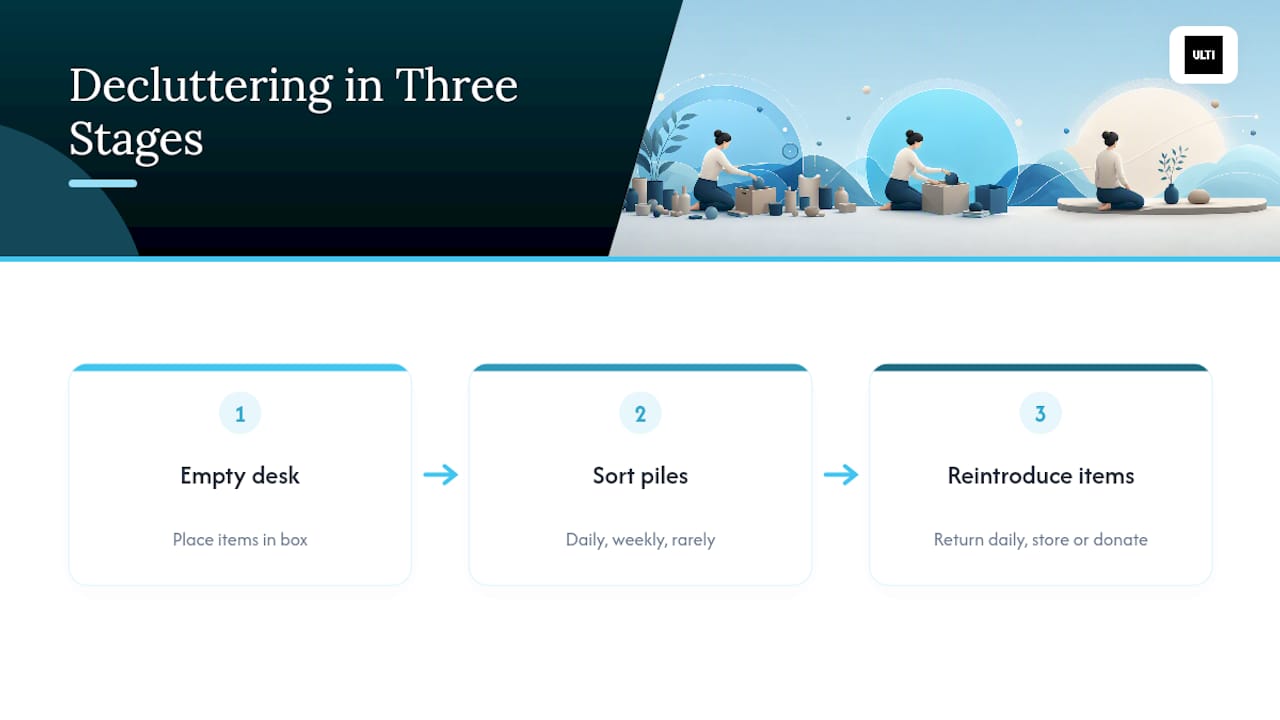
Start by removing every single item from your current desk, including the ones you assume are essential. Put them all in a box or on the floor nearby.
Sort what's left into three piles: items used daily, items used weekly, and items used rarely or never. The daily pile goes back on the desk. The weekly pile goes into a drawer or nearby shelf. The rarely-used pile gets stored elsewhere in your home or donated if you haven't touched it in months.
Clean the empty desk surface properly before anything goes back, dust and grime build up under monitor stands and keyboards more than people expect.
Reintroduce items from your daily pile one at a time, placing each in its most logical spot: monitor centred and at eye level, keyboard and mouse within easy reach, and your one personal item somewhere it won't interfere with movement. This slower reassembly is what stops "just in case" items sneaking back onto the surface, a version of the blank canvas method that practitioners rely on to keep clutter from creeping back.
Storage solutions that maintain minimalism without sacrificing accessibility
Minimalism fails when it makes daily items harder to find, storage needs to be close enough to use, but out of sight from the desk surface itself.
Under-desk drawers are the most accessible option, since they keep items within arm's reach without occupying visible space. A shallow drawer for notebooks, spare cables, or stationery works well for most home offices.
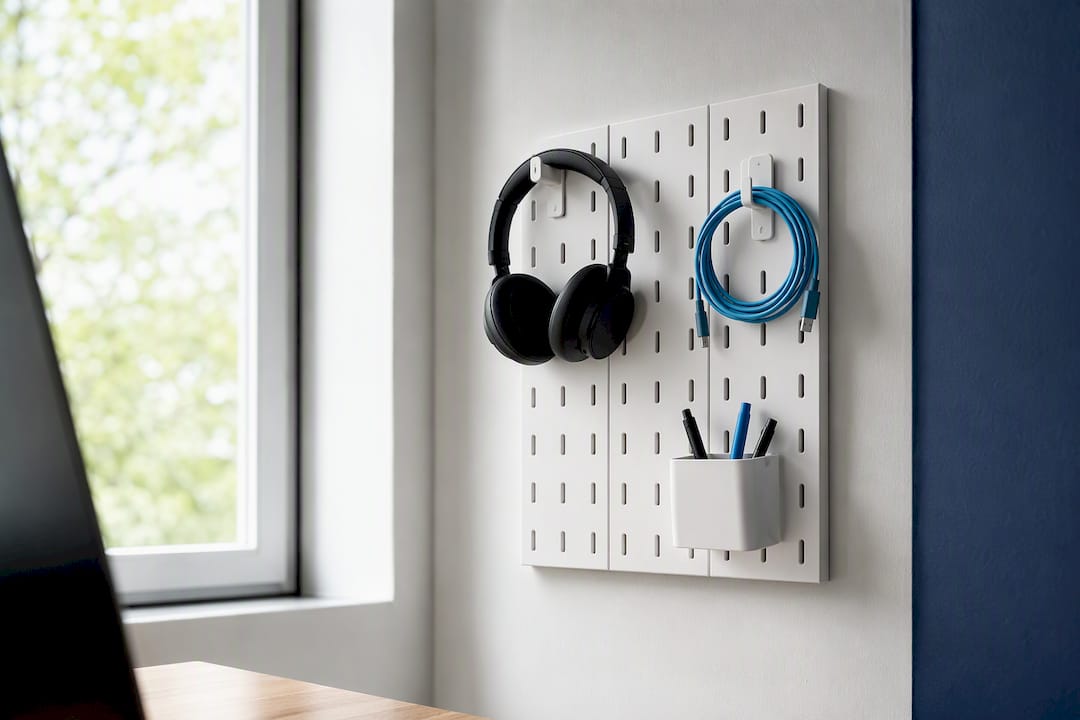
Wall-mounted pegboards and shelving free up floor and desk space simultaneously. A modular pegboard organiser can hold headphones, cables, and small tools on the wall behind your monitor, visible enough to grab quickly, tidy enough not to clutter the desk itself.
For anyone in a shared or multi-purpose room, look at stackable boxes or a rolling storage cart that tucks under the desk when not needed. This suits the hybrid home and office layout mentioned earlier, since everything can be wheeled away when the room needs to serve another purpose.
The rule that ties all of this together: store by frequency of use, not by category. Daily items go closest to hand, whether that's a drawer or an open shelf, and rarely-used items go furthest away, even if that means a cupboard in another room.
Author perspective: trade-offs we see, and what actually works
Fixed minimal desks look cleaner in photos, but a motorised sit-stand desk earns its keep through daily use, not aesthetics. Our honest advice: change one thing at a time and live with it for a week before adding the next. One customer swapped a cluttered corner setup for a single monitor arm and a cable tray alone, no new desk, and reported the room finally felt calm.
— ULTI
How Ulti can help you build a minimal desk
If you've read this far and you're eyeing your current desk with new suspicion, targeted purchases of monitor arms, cable management accessories, and electric standing desks built specifically to solve clutter problems can help you avoid a full overhaul.

Start with whichever gap is costing you the most visual noise. If your monitor still sits on its factory stand, the T30 Ultra Spring-Assisted Monitor Arm frees the surface underneath and routes cables through its arm. If cables are the main issue, browse Ulti's workspace accessories for trays, hubs, and organisers built to disappear under the desk rather than sit on top of it. And if you're ready to rethink the whole setup, explore Ulti's full range or visit the Singapore showroom to see how the pieces fit together before you buy.
Sources
- Minimalist Home Office Setup: Complete 2026 Guide | DeskDNA
- How to Build a Minimalist Desk Setup That Actually Works - Computer Station Nation
FAQ
What Is a Minimal Desk Setup?
A minimal desk setup is a work surface holding only the items used during a standard session, typically a monitor, keyboard, mouse, and one personal object, with everything else stored out of sight.
What's the Single Best Upgrade for a Minimal Desk?
A monitor arm delivers the most visible change for the effort, since it frees the desk surface entirely and creates a floating screen effect.
How Much Does a Minimal Desk Setup Cost?
Upgrading existing furniture with a monitor arm, cable hub, and desk pad can run from a few hundred dollars, while replacing furniture entirely typically pushes the total past a thousand.
Do I Need a Standing Desk for a Minimal Setup?
No, a fixed desk works fine if it's the right size and kept clear, though an electric sit-stand desk like Ulti's adds posture benefits without sacrificing the minimal look, provided cables are routed through the frame.
How Often Should I Reset My Desk?
Clear the surface daily in under a minute, then run a weekly box test, removing everything and reintroducing only what you actually used that week.