
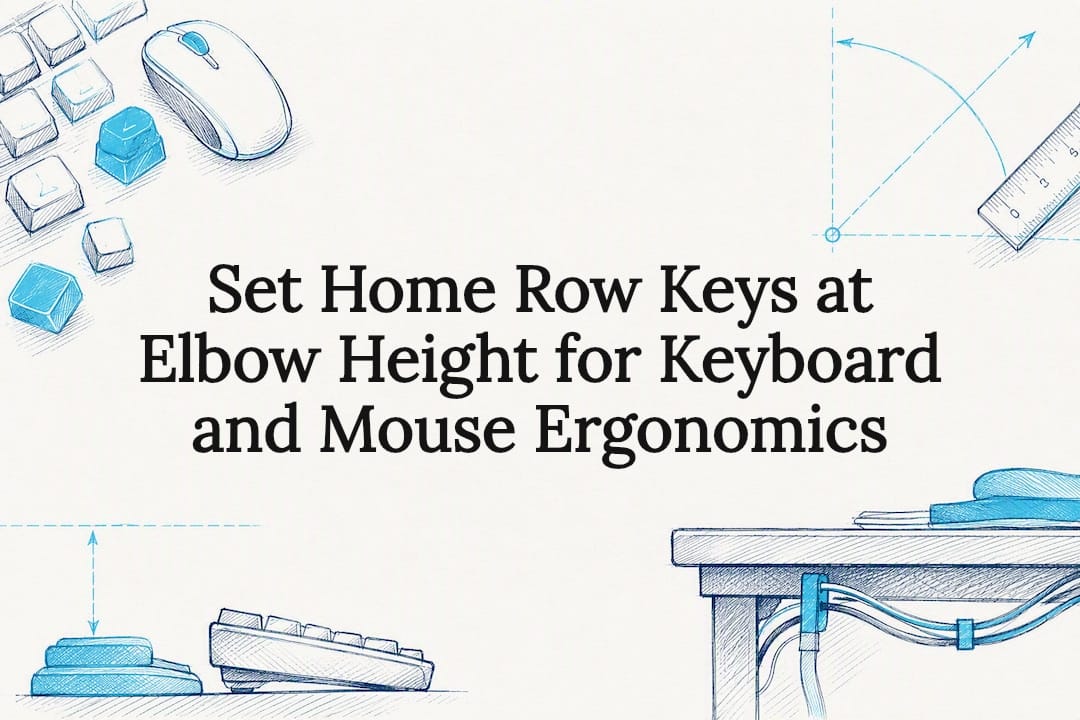
Set the top of your home-row keys at or slightly below elbow height, keep your elbows bent at a relaxed angle close to 90 degrees, and keep the mouse directly beside the keyboard at the same level. That single adjustment resolves most of the wrist strain people blame on their keyboard or mouse. Two checks confirm it: sit normally, let your shoulders drop, and measure your elbow angle; then look down and check whether your mouse is touching your keyboard's edge or several inches away.
TL;DR:
- Proper setup begins with chair and monitor adjustments to ensure your elbows are slightly below eye level and your shoulders relaxed before positioning the keyboard or mouse.
- The keyboard height should align with the top of the home-row keys at or just below elbow height, with elbows bent between 90 and 110 degrees, and avoiding positive tilt.
- Place the mouse directly beside the keyboard on the same surface at the same height to prevent shoulder strain and reduce reaching.
- Micro-breaks every 20 minutes, involving shoulder rolls and wrist stretches, significantly decrease fatigue caused by static muscle load.
- Adjustable furniture like sit-stand desks, monitor arms, and ergonomic chairs facilitate maintaining ideal postures and should be prioritized over fixed setups.
Table of Contents
- What quick workstation checks fix keyboard and mouse ergonomics fastest?
- How high should your keyboard sit for neutral wrists?
- Where should the mouse sit, and how should you move it?
- Do wrist rests and ergonomic keyboards actually help?
- How much difference do micro-breaks really make?
- How ULTI's furniture makes these adjustments easier to hold
- Which hand and wrist exercises reduce strain?
- Does desk height and surface really change the ergonomics?
- Practitioner summary: what to change first and why
- Where to start if you're ready to fix your setup
- Sources
- FAQ
What quick workstation checks fix keyboard and mouse ergonomics fastest?
Keyboard and mouse ergonomics don't start at the keyboard. They start at the chair and the monitor, because both dictate where your hands end up. If your chair sits too low, your elbows drop below the keyboard and your wrists bend upward to compensate. If your monitor sits too low, your head drops forward and your shoulders round, pulling your forearms out of a neutral line.
Get these three settings right before you touch keyboard height at all:
- Set your chair so your feet rest flat on the floor or on a footrest, with knees slightly lower than your hips.
- Adjust lumbar support so your lower back stays supported and armrests so your shoulders sit relaxed, not hunched or shrugged.
- Set monitor height so the top third of the screen sits roughly at eye level, which keeps your head balanced instead of tipped forward.
Once your seat and screen are correct, your arms naturally fall into a relaxed, close-to-body position. That's the platform every other keyboard and mouse adjustment builds on. Skip it, and even a properly measured keyboard height won't stop the strain, because your shoulders are doing the compensating instead.
How high should your keyboard sit for neutral wrists?
Measure to the top of the home-row keys, not the desk surface and not the keyboard case. Keycap height varies enough between models that measuring from the desk alone can put your wrists in extension without you noticing. Sit naturally, relax your shoulders, and check where your fingertips land when your forearms are parallel to the floor.
The target most occupational health guidance converges on is the 9010 rule: elbows bent between 90 and 110 degrees, upper arms relaxed against your sides, forearms roughly level. At that angle, the top-row keys should sit at or slightly below elbow height.
The 90/10 elbow standard: Guidelines from the University of Washington recommend lowering the keyboard's rear legs to flatten it, or applying a slight negative tilt, so your wrists don't cock upward while typing.
A few placement rules matter as much as height:
- Keep the keyboard flat or angled slightly away from you (negative tilt); avoid positive tilt, which forces wrist extension on every keystroke.
- Centre the keyboard to your body, not to the desk, so you're not reaching sideways to reach the middle row.
- If a full-size keyboard forces you to overreach for the mouse, a compact or tenkeyless layout, or a split keyboard, shortens that reach considerably.
If your desk is fixed height and too high for this, a keyboard tray, footrest, or desk riser can close the gap without replacing the desk.
Where should the mouse sit, and how should you move it?
Reaching for a mouse that sits above, behind, or far from the keyboard loads your shoulder and forces your wrist to compensate for the rest of the arm's poor position. Cornell's ergonomics guidance is direct on this: keep the pointing device close to the keyboard and at the same surface height, full stop.
Four habits fix most mouse-related strain:
- Place the mouse on the same surface and at the same height as the keyboard, immediately beside it, so there's no reach involved at all.
- Move the mouse using your forearm and shoulder rather than flexing only your wrist. Think of it as dropping your whole arm onto the mouse rather than stretching your fingers toward it.
- Set pointer sensitivity high enough that small hand movements cover the screen, reducing the force and distance your hand travels for each action.
- Where practical, alternate hands periodically, or switch between a standard mouse and a trackball, to avoid loading the same tendons all day.
Mouse position is one of the most overlooked pieces of proper mouse usage. People will spend money on an ergonomic keyboard and leave the mouse sitting six inches further right, on a mousepad that's slightly higher than the keyboard tray. That gap alone recreates the exact strain the new keyboard was meant to solve.
Do wrist rests and ergonomic keyboards actually help?
Accessories help when they're used correctly and hurt when they're used as a crutch for bad positioning. A wrist rest is a pause aid, not a typing surface. Support your palms on it between bursts of typing; resting your wrists on it while your fingers are actively moving compresses the tendons running through the carpal tunnel, which is the opposite of what it's meant to do.
Pro Tip: Rest your palms on the pad when you stop to think or read, not while your fingers are moving. If your wrists are touching the rest during active typing, the rest is too high or you're leaning into it.
Ergonomic keyboard design covers a genuinely wide range: split keyboards that separate the two halves, vertical mice that keep the forearm in a handshake position, tented keyboards that angle the two sides upward. None of them is universally best. CCOHS is clear that the goal is neutral wrist alignment, not a specific device shape, and what works varies by hand size, task type, and existing discomfort.
- Try one change at a time rather than overhauling your entire setup in a single week.
- Use each new device for about five working days, noting comfort and productivity before deciding whether it's worth keeping.
- If discomfort persists after two or three device changes, the problem is more likely posture or desk height than the device itself.
How much difference do micro-breaks really make?
Static posture, not typing itself, is often the bigger driver of fatigue. Holding your arms in the same position for hours, even a correct one, still strains the same muscles repeatedly. Research on upper-limb musculoskeletal disorders backs short, frequent micro-breaks and task variation as one of the more effective ways to cut that risk.
A routine that takes almost no planning:
- Every 20 minutes, stand up for a few seconds and let your arms hang loose.
- Roll your shoulders backward five times and stretch your wrists gently in both directions.
- Aim for a longer break, around five minutes, roughly every 20 minutes of continuous typing or mousing.
- Use a phone reminder, calendar alert, or break-tracking software so this doesn't depend on remembering.
Pair these breaks with a quick posture check each time. It takes ten seconds and catches the slow slide back into hunched shoulders or a dropped wrist that happens without you noticing.
How ULTI's furniture makes these adjustments easier to hold
Getting the numbers right on paper is one thing. Holding that position for eight hours on furniture that doesn't move with you is another. This is where the furniture itself becomes part of the ergonomics equation, not an afterthought to it.
- Height-adjustable desks let you match keyboard height to elbow height precisely, rather than settling for whatever a fixed desk gives you, and let you switch between sitting and standing without losing that alignment.
- Monitor arms put screen height and distance under independent control, so you can hit eye-level positioning without also having to solve keyboard height at the same desk surface.
- Ergonomic chairs with adjustable lumbar support and armrests keep your shoulders relaxed, which is the seated foundation every keyboard and mouse adjustment depends on.
Pairing an adjustable sit-stand desk with a monitor arm, for instance, means you can set keyboard height for your seated elbow angle and separately fix screen height, rather than compromising one for the other. An ergonomic chair with proper armrest height does the same job for your shoulders that a wrist rest does for your palms.
Which hand and wrist exercises reduce strain?
Strengthening and mobility work won't fix a badly positioned keyboard, but it does build resilience against the repetitive load that even a well-set-up desk still produces over an eight-hour day. A handful of exercises cover most of what desk workers need.
Wrist extensor stretch: extend one arm forward, palm down, and gently pull your fingers back toward your body with the other hand. Hold for 15 to 20 seconds per side. This counters the tightening that happens after hours of keys pressed under slightly flexed wrists.
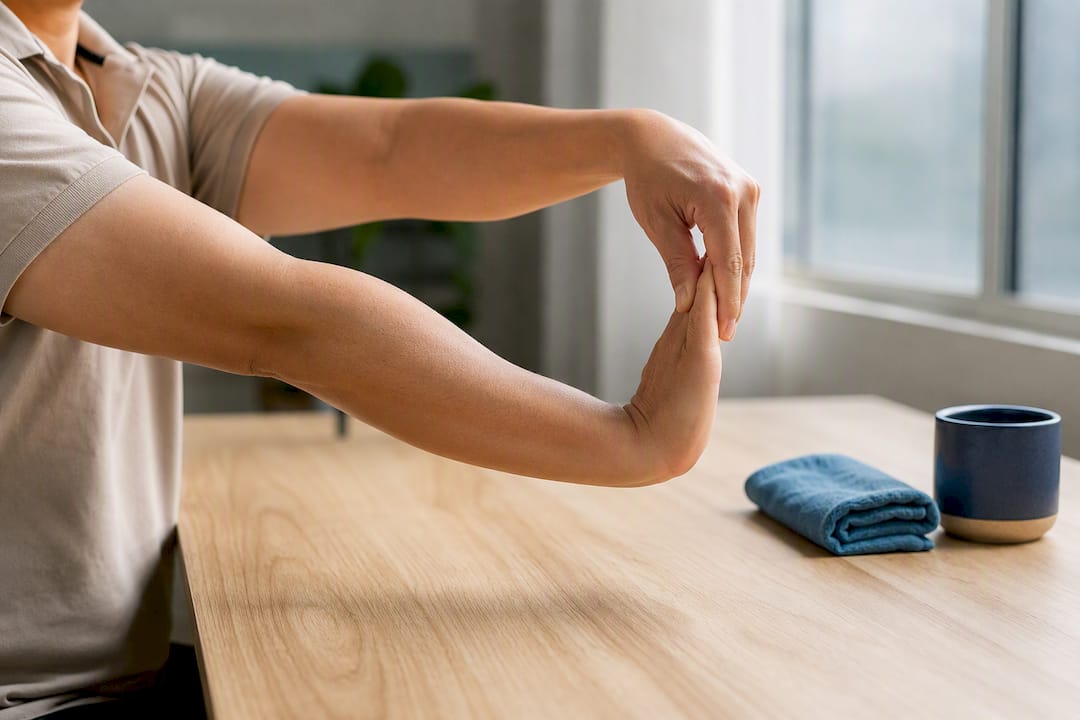
Wrist flexor stretch: same position, but rotate your palm upward and pull fingers gently backward. This targets the opposite muscle group and is worth alternating with the extensor stretch through the day.
Tendon glides: move your fingers through a sequence, straight, hook fist, full fist, straight fist, holding each position briefly. This keeps the tendons that run through the carpal tunnel moving freely rather than staying compressed in one position.
Grip strengthening: squeezing a soft ball or stress ball for a few seconds at a time builds the small muscles in the hand that support fine motor control during typing and clicking.
Forearm rotation: hold your arm out, elbow bent at 90 degrees, and slowly rotate your palm up and down. This loosens the forearm muscles that control wrist movement, which tighten from sustained mouse use more than most people expect.
None of these need equipment or more than a couple of minutes. Doing them once or twice through the working day, ideally paired with your micro-breaks, keeps the muscles around your wrists more resilient to the repetitive load that even correct positioning still produces.
Does desk height and surface really change the ergonomics?
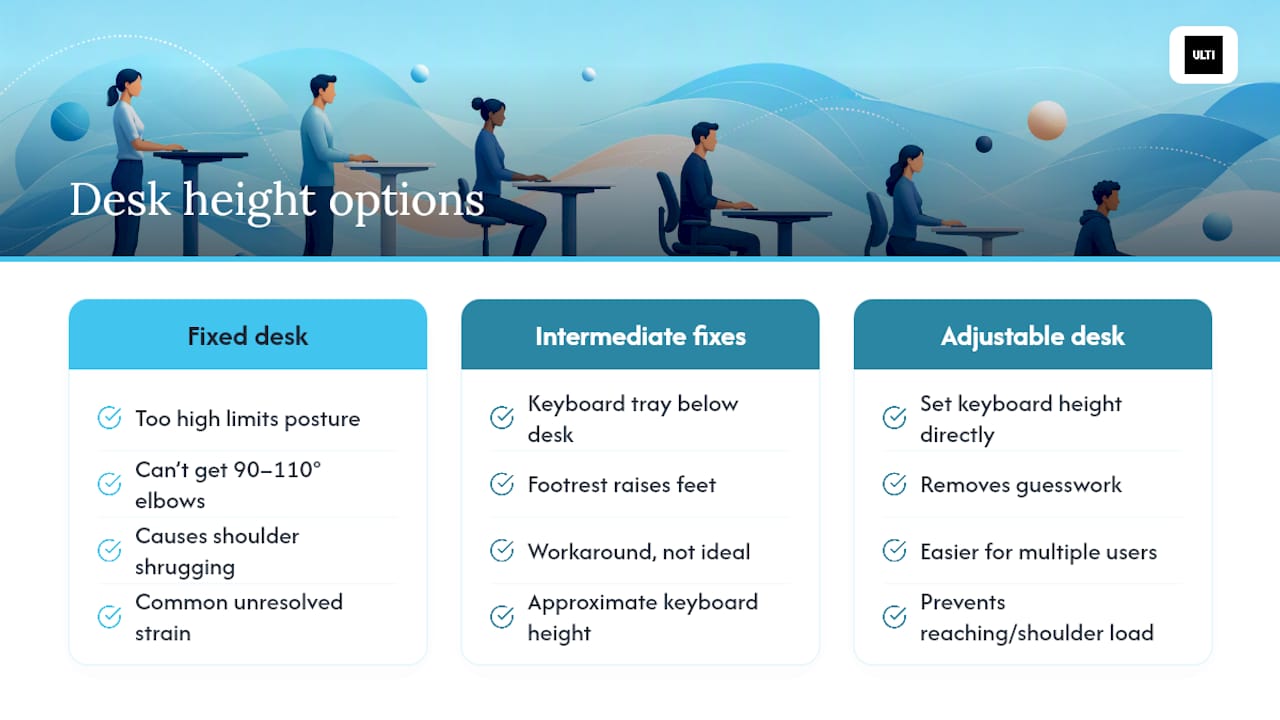
Desk height sets the ceiling on everything else. If the desk itself is too high and fixed, no amount of chair or keyboard tweaking gets your elbows to a proper 90 to 110 degree angle without your shoulders shrugging to compensate. This is why fixed-height desks are such a common source of unresolved strain, even for people who've otherwise done everything right.
The surface matters too, separately from the height. A desk deep enough to let your keyboard sit centred with the mouse beside it, rather than crowded against a monitor stand or pushed to one edge, removes the reaching that causes shoulder loading. A shallow desk often forces the mouse further out or the keyboard closer to the edge than the 9010 elbow angle allows.
Where a desk can't be raised or lowered, a keyboard tray sitting below desk level, or a footrest raising your feet to compensate for a chair set higher than ideal, both work as intermediate fixes. But they're compromises. A height-adjustable desk removes the guesswork entirely, because you're setting keyboard height directly rather than working backward from a chair, tray, and footrest combination to approximate it. That flexibility also matters if more than one person uses the same desk, since a fixed height that suits one person's elbow angle rarely suits another's.
Practitioner summary: what to change first and why
Fix your chair and monitor before touching the keyboard. That's the sequence that gets results fastest, since keyboard height only matters once your seated posture is correct. Then set keyboard height, then mouse proximity, then build in movement habits. The two mistakes to drop immediately: positive keyboard tilt, and letting your wrists rest on the desk or a pad while your fingers are still typing. If pain persists after these changes, an occupational therapist or ergonomic assessor can catch anatomical factors a general guide can't.
— ULTI
Where to start if you're ready to fix your setup
Most people trying to fix keyboard and mouse ergonomics hit the same wall: their desk doesn't move, so every adjustment becomes a compromise between chair height, footrests, and keyboard trays stacked on top of each other. A height-adjustable desk removes that compromise by letting you set keyboard height directly, and pairing it with a monitor arm means screen height stops competing with keyboard height for the same fixed surface.
Start with ULTI's range of standing desks, ergonomic chairs, and monitor arms, built with dual-motor height adjustment and reinforced steel frames for daily use. If you're unsure what fits your space, ULTI's ergonomic chair finder and monitor arm compatibility checker narrow the options based on your desk and monitor setup. Before ordering, measure your existing desk height, note your seated elbow height, and check the clearance under your desk for a footrest or keyboard tray. That five-minute check saves a returned order and gets your new furniture set correctly from day one.
Sources
- Posture and your workstation (University of Pittsburgh EHS)
- PubMed: review on static posture and micro-breaks
- University of Washington: Workstation adjustment guidelines
- Cornell University Ergonomics Web: Ergoguide
FAQ
What are the proper ergonomics for using a keyboard and mouse?
Keep your elbows bent between 90 and 110 degrees, keyboard top-row at or slightly below elbow height, and the mouse directly beside the keyboard at the same level, per University of Pittsburgh EHS guidance.
What are ergonomic keyboards and mice?
They're input devices designed around alternative shapes, split layouts, vertical grips, or tented angles, aimed at keeping wrists in a more neutral position than a standard flat keyboard and mouse allow.
Do ergonomic keyboards actually work?
They can help once your chair, monitor, and desk height are already correct, but CCOHS notes there's no single best design, since the real goal is neutral wrist alignment rather than a specific shape.
What is the best ergonomic keyboard and mouse?
There isn't one universal answer. The better approach is testing a change, such as a split keyboard or vertical mouse, for about a working week and tracking comfort before deciding whether it suits your hands and tasks.
How high should a desk be for proper keyboard and mouse ergonomics?
Desk height should let the keyboard's home-row keys sit at or slightly below your seated elbow height. A height-adjustable desk lets you set that precisely rather than compensating with trays or footrests.